

The deliverable
A market study ready for client review.
Every study runs fourteen to eighteen pages and follows the same section order.
What is in a MarketStudyBuddy site selection report?
A MarketStudyBuddy site selection report describes the market around one address: how many people live and work inside its trade areas, what they earn, how far they can travel to reach it, and which businesses already trade nearby. It also includes a screening index for the business format being considered.
It runs fourteen to eighteen pages depending on the site. The download includes the spreadsheets, slides, and map files used for further analysis and presentations.
How is a MarketStudyBuddy report organized?
The executive summary presents the market assessment and screening result. The remaining sections provide the supporting figures, maps, sources, and scope.
- Executive summaryThe headline numbers, a written read of the market, and the screening index.
- Trade area and accessHow far the site draws from, by distance and by drive time, on a map.
- Demographic profilePopulation, households, density, and tenure for every trade area side by side.
- Income, age, and compositionSpending power, age structure, and education, set against national benchmarks.
- Neighborhood income mapWhere the money is around the site, block by block.
- Economic and commute profileThe daytime population, how people get to work, and how far they travel.
- Nearby businessesBusinesses already operating nearby, grouped by category, mapped, and counted.
- Analyst assessmentWhat the figures support, what they argue against, and what to check on site.
- Sources and scopeWhat the study covers, what it excludes, and when it was run.
How does MarketStudyBuddy measure a site's trade area?
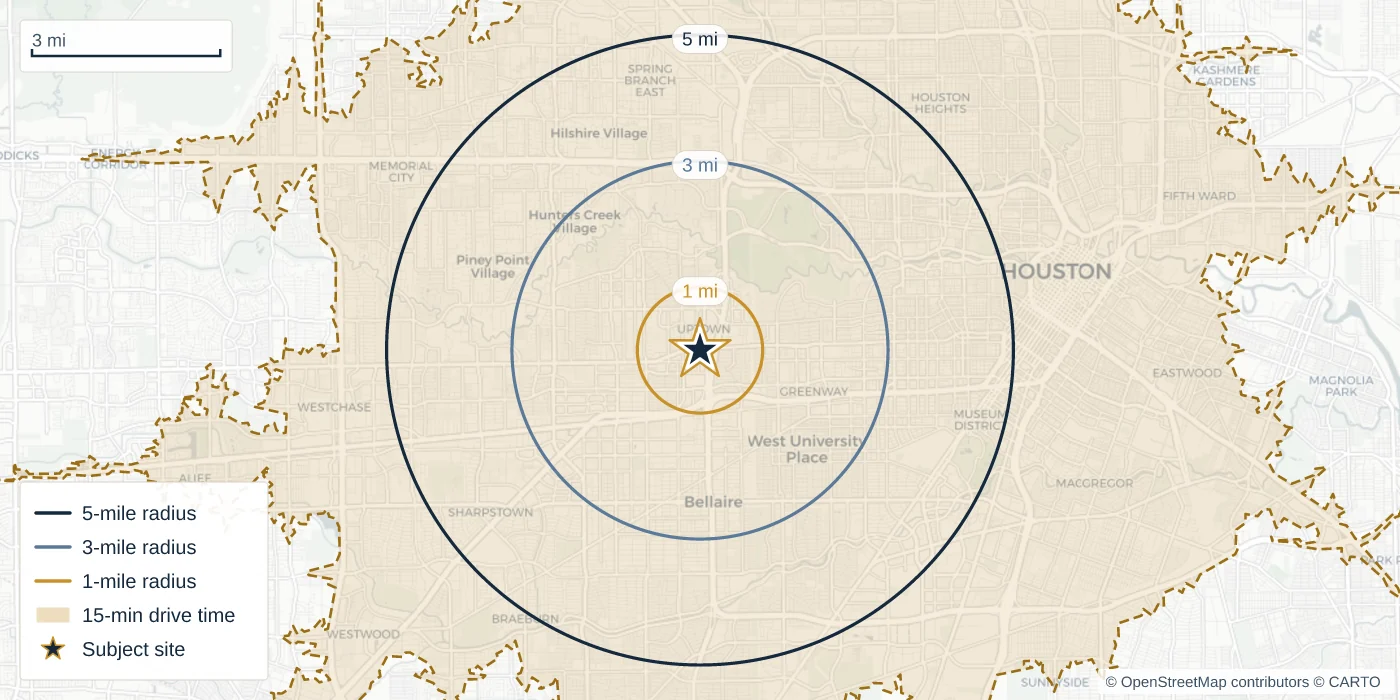
The study measures the market at a 1-mile, 3-mile, and 5-mile radius as well as a 15-minute drive time. The drive-time area reflects the areas from which customers could drive to the location in 15 minutes.
What evidence appears in a MarketStudyBuddy report?
The report includes the figures and nearby business counts behind its assessment. Both examples below come from one real study of 2211 Westheimer Rd, Houston, TX 77098.
| Trade area | Population | Households | Median income |
|---|---|---|---|
| 1-mile ring | 27,425 | 14,719 | $124,900 |
| 3-mile ring | 205,953 | 109,850 | $116,743 |
| 5-mile ring | 515,942 | 249,084 | $94,473 |
| 15-minute drive | 940,712 | 416,004 | $73,531 |
1,992businesses within 3 miles
- Restaurants and food798
- Retail and shopping543
- Consumer services415
- Fitness and wellness103
- Grocery and markets98
- Entertainment35
Businesses in the trade area, counted by category. These counts describe nearby competition; they are not a verified tenant roster.
Can MarketStudyBuddy adapt a study to the business format?
Yes. Choose the business format so the study uses the relevant primary trade area and competition categories.
- General retail
- Quick-service restaurant
- Fast-casual restaurant
- Full-service restaurant
- Grocery / supermarket
- Luxury / premium retail
- Fitness / wellness
- Coffee / café
- Or your own
Each format draws its trade area from a different distance and counts a different set of businesses as competition. Define your own and it is saved for everybody in your organization, so every site is screened the same way.
What files does MarketStudyBuddy produce?
Every run includes the report, slides, tables, map images, and trade-area geometry in standard file formats.
- PDF reportThe typeset document, ready to attach to an email or a package.
- Digital reportThe same study as a web page, shareable with a link.
- PowerPoint deckCover, numbers, maps, and the index as editable slides.
- Excel workbookEvery table in the report, one sheet per section.
- CSV of the figuresThe numbers for each trade area, ready for your own model.
- Map filesThe trade-area geometry, if your team works in a mapping tool.
- Map imagesTrade area, neighborhood income, and competition, at print resolution.
- One ZIPEvery report file in a single download.
What does MarketStudyBuddy leave out?
MarketStudyBuddy does not include foot traffic, lease comparables, sales forecasts, or the permit pipeline. Use it to screen a market and present the case for a site.
- Foot trafficno visit counts and no dwell times
- Lease comparablesno rents, no tenant rosters, no deal history
- Sales forecaststhe index ranks a market, it does not predict revenue
- Permit pipelineno under-construction or entitled supply
The report identifies these exclusions alongside the market screening results.
What else should you know about a MarketStudyBuddy report?
Are the PowerPoint and Excel files editable, or pictures of files?
Both files are editable. The deck contains individual slides, and the workbook contains the report tables in separate sheets.
Can I send a report to someone who has no account?
Yes. A study can produce a share link that opens the report under your firm's name, and you can revoke the link later.
Can I compare several sites in one document?
Yes. A comparison puts several addresses through the same study and produces one deck and one workbook that rank them side by side.
How current are the figures?
Every study uses the most recent published data available on its run date. The report records that date for reference.
For how this fits your desk, see who it is for.
Start your next market study with MarketStudyBuddy.
Create your account, enter any US street address, and build the finished report in two minutes.